


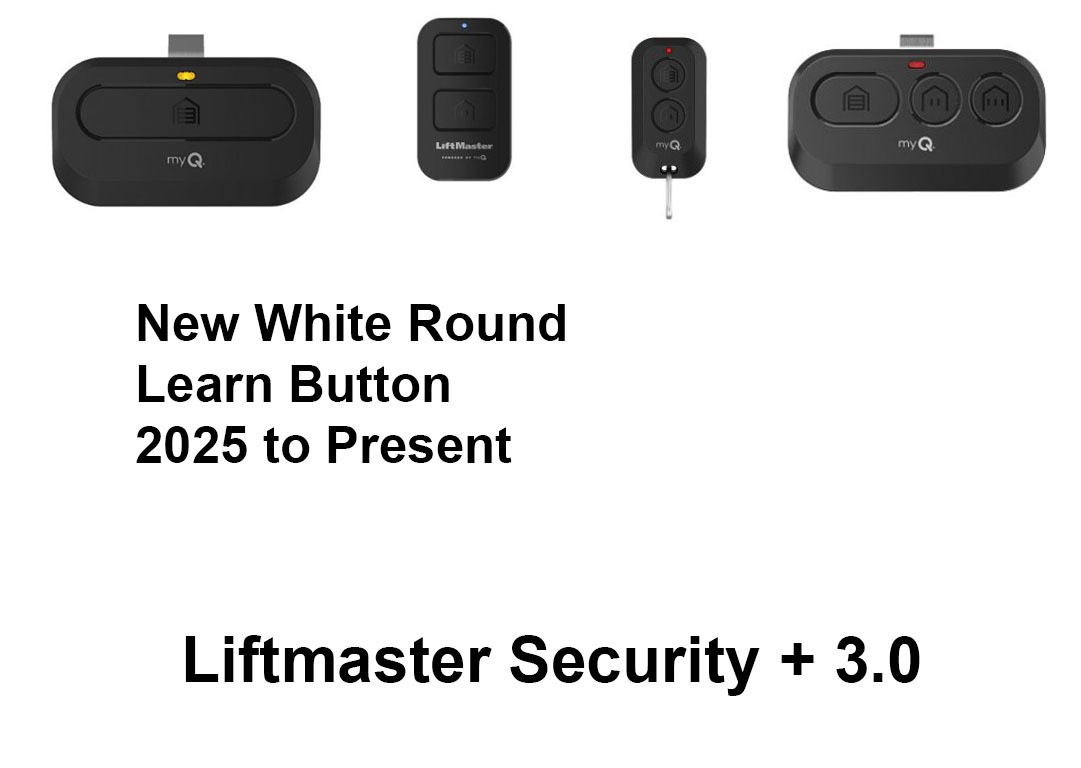
LiftMaster Security+ 3.0 Remotes & Keypads
LiftMaster Security+ 3.0 Remotes & Keypads
Security+ 3.0 is LiftMaster's current radio format, fitted to the newest generation of garage door openers and gate operators. It uses rolling code — every press sends a new code, so a captured signal cannot be replayed at your door. The remotes are the L-series: L991S, L993S, L993M, L932M, L992U and the L979 keypads.
The letter at the end of the part number is the important part. It tells you which openers the remote will work with. Get this right and everything else follows.
What do the S, M and U suffixes mean?
| Suffix | Works with | Choose it when |
|---|---|---|
| S | Security+ 3.0 only | Your opener is current-generation and everything on the property is 3.0. The straightforward choice. |
| M | Security+ 3.0 and Security+ 2.0 | You have a mix of older and newer LiftMaster openers — one remote covers both. |
| U | Universal — LiftMaster plus other brands | The property runs equipment from more than one manufacturer. |
Which remote do I need?
| Model | Buttons | Style | Compatibility |
|---|---|---|---|
| L991S | 1 | Visor | Security+ 3.0 only |
| L993S | 3 | Visor | Security+ 3.0 only |
| L993M | 3 | Visor | Security+ 3.0 and 2.0 |
| L932M | 2 | Keychain | Security+ 3.0 and 2.0 |
| L992U | 2 | Visor | Universal — other brands too |
Wireless keypads
A keypad mounts outside the door and needs no wiring to the opener. Useful for children, contractors, or anyone who would rather not carry a remote.
| Model | Compatibility |
|---|---|
| L979S | Security+ 3.0 only |
| L979M | Security+ 3.0 and 2.0 |
| L979U | Universal — other brands too |
Do I have Security+ 3.0 or 2.0?
If your opener is new, it is 3.0. If it is a few years old, check the learn button on the motor unit:
| Opener | Format | Order |
|---|---|---|
| Current generation, bought new recently | Security+ 3.0 | Any S or M remote on this page |
| Yellow learn button | Security+ 2.0 | An M remote from this page, or see Security+ 2.0 remotes |
| Purple, red, orange or green learn button | Older Security+ or Billion Code | See replacement remotes by learn button colour |
Not sure, and you have more than one opener? Choose an M model — the L993M or L932M. They cover both Security+ 3.0 and 2.0, so one remote handles a mixed property and you are not guessing.
Clips and covers
| Part | What it is |
|---|---|
| 041-0494-000 | Remote control visor clip |
| 041-0495-000 | Keypad battery cover |
Programming your remote
1. Find the learn button on the motor unit — on the back or side, usually beside the antenna wire. Not on the wall control.
2. Press and release it. The LED beside it comes on for about 30 seconds.
3. Within those 30 seconds, press the button on the new remote.
4. The opener light flashes or the unit clicks to confirm. Test the door.
To erase every remote from memory, press and hold the learn button until the LED goes out — around six seconds. That clears all of them, so reprogram every remote you want to keep.
Common questions
What is the difference between Security+ 2.0 and 3.0? Both are rolling code. 3.0 is the current generation on the newest openers. A 3.0-only remote (the S models) will not work on a 2.0 opener — but an M model works on both.
Will a Security+ 2.0 remote work on my 3.0 opener? No. Order an S or M model from this page.
Which should I get, S or M? If every opener on the property is current-generation, S is fine. If you have anything older with a yellow learn button, get M and cover both with one remote.
Does this work with myQ? Yes. myQ is the Wi-Fi and app layer; Security+ 3.0 is the radio between remote and opener. They are independent and both work at once.
Can I use a Chamberlain remote? LiftMaster and Chamberlain share the same radio platform, so a matching-generation Chamberlain remote will work. Only the branding differs.
My remote programmed but the range is poor. Check the antenna wire hangs freely from the motor unit and is not coiled up or tucked away.
How many remotes can one opener hold? Several. If a new one refuses to program, the memory may be full — erase and reprogram.
Other LiftMaster remote generations
Security+ 2.0 — yellow learn button · 37xLM — purple, 315 MHz · 97xLM — red/orange, 390 MHz · not sure? start here
Related
all LiftMaster remotes · wireless keypads · all remote controls
Not sure which remote you need? Send a photo of the learn button on your opener to parts@gatehousesupplies.com or call 866-965-5599 — we will identify it in a minute.
- Liftmaster L993S, 3-Button Remote
- LiftMaster L993M 3-Button Remote - Security+ 3.0 (White Learn Button), Security+ 2.0 and Security+ - Multi-Frequency, Replaces 893MAX
- Liftmaster L992U, 2-Button Universal Remote
- Liftmaster L991S, 1-Button Remote
- LiftMaster L979U Universal Wireless Keypad (Chamberlain CHU48) - LiftMaster, Chamberlain, Craftsman 1993 On incl. Green Button, Genie, Linear, Stanley
- LiftMaster L979S Wireless Keypad - Security+ 3.0 White Learn Button Openers Only (2220L, 2420L, 6580L, 6690L, 4690L) - myQ PIN Management
- LiftMaster L979M Wireless Keypad - Security+ 3.0, 2.0 and Security+ (White, Yellow, Purple, Red/Orange Button) - Replaces 878MAX, 877MAX, 877LM
- Liftmaster L932M, 2-Button Keychain Remote
- Liftmaster 041-0495-000 Keypad Battery Cover
- Liftmaster 041-0494-000 Remote Control Visor Clip