


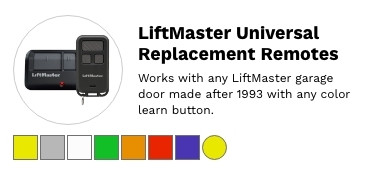
LiftMaster Replacement Remotes & Clickers
How to Find the Right LiftMaster Replacement Remote
You do not need to know your remote's part number. You need to know one thing: the colour of the learn button on your opener. That single detail tells you which radio format your system uses, and everything follows from it.
Step 1 — find the learn button
It is on the motor unit, not the wall control. Get a stepladder and look at the back or the side of the opener, usually beside the antenna wire hanging down. On some models it is under the light lens. On a gate operator it is inside the control box.
Step 2 — match the colour
| Learn button | Format | Era | Single button | Multi button |
|---|---|---|---|---|
| Yellow | Security+ 2.0 | 2011 onward | 891LM | 892LT, 893MAX, 894LT |
| Purple | Security+ 315 MHz | 2005–2011 | 371LM | 373LM, 893MAX |
| Red / orange | Security+ 390 MHz | 1997–2005 | 971LM | 893MAX, 894LT |
| Green | Older 390 MHz | 1993–1997 | 893MAX | |
| Grey / none | Dip switch | Pre-1993 | Count the switches inside your old remote and match the format | |
If you want one remote that covers everything, get the 893MAX. It is tri-band across 310, 315 and 390 MHz, so it works on yellow, purple, red, orange and green learn button openers alike. It is also the answer when you have no working remote left, because it programs at the opener rather than learning from another remote.
Step 3 — decide how many buttons
| You need | Get this |
|---|---|
| One door, cheapest option | The single-button remote for your colour, from the table above |
| Two doors | 892LT or L932M |
| Three doors, or mixed openers | 893MAX or L993M |
| Four doors | 894LT |
| Something for a keyring | 890MAX or L932M |
| No remote at all — a keypad by the door | 878MAX or VKP1-LM |
I know my opener model but not my remote
Opener model numbers such as 3280, 1499A, 7675 or 8355 do not tell you the remote directly — the same opener was built across more than one radio generation. Go by the learn button colour instead; it is on the machine in front of you and it is definitive.
If you cannot see a learn button at all, or the label has worn away, send us a photo of the motor unit and we will identify it.
Current LiftMaster remotes
| Model | Buttons | Works with |
|---|---|---|
| 371LM | 1 | 315 MHz — purple |
| 890MAX | 3 | Mini keychain remote |
| 891LM | 1 | Security+ 2.0 — yellow |
| 892LT | 2 | Learning remote — also programs to non-LiftMaster systems |
| 893MAX | 3 | Tri-band 310/315/390 MHz — yellow, purple, red, orange and green. Replaces the 371LM, 971LM, 973LM and 893LM. |
| 894LT | 4 | Learning remote |
| 971LM | 1 | 390 MHz — red or orange |
| L932M | 2 | Keychain remote |
| L992U | 2 | Universal — learns from an existing working remote |
| L993M | 3 | Three-button visor remote |
Wireless keypads
A keypad mounts outside the door and needs no wiring to the opener. Useful for children, contractors, or anyone who does not want to carry a remote.
| Model | What it is |
|---|---|
| 878MAX | Tri-band wireless keypad — works with Security+ 2.0 and older LiftMaster systems |
| L979M | Wireless keypad |
| L979U | Universal keypad |
| VKP1-LM | myQ Smart Garage video keypad — camera and intercom built in |
| VKP1-MYQ | Chamberlain-branded myQ video keypad |
The 811LMX and 813LMX are commercial door remotes. They work with commercial door receivers only and will not operate a residential garage door opener, whatever colour the learn button is. If you have a garage door opener at home, use one of the remotes above.
The 374UT and 380UT universal remotes are being phased out. For a LiftMaster opener the 893MAX is the better answer — it covers every learn button colour and does not need a working remote to learn from. Reach for a universal only when the property also runs another brand.
Programming your new remote
1. Find the learn button on the motor unit.
2. Press and release it. The LED beside it comes on for about 30 seconds.
3. Within those 30 seconds, press the button on the new remote.
4. The opener light flashes or the unit clicks to confirm. Test the door.
To erase every remote from memory — worth doing if you have just bought the house, or lost one — press and hold the learn button until the LED goes out, around six seconds. That clears them all, so reprogram every remote you want to keep.
Common questions
Where is the learn button? On the motor unit itself, not the wall control. Usually beside the antenna wire, sometimes under the light lens. You will need a stepladder.
My opener is very old and has no learn button. Then it is pre-1993 and uses dip switches. Open your old remote — there will be a bank of small switches inside. Count them and call us; we will match the format.
Will a Chamberlain or Craftsman remote work? Yes, if the learn buttons match. LiftMaster, Chamberlain and Craftsman share the same radio platform — only the branding differs.
How many remotes can one opener hold? Most hold several. If a new one refuses to program, the memory may be full — erase and reprogram.
My remote worked yesterday and not today. Change the battery before anything else. It is the cause the overwhelming majority of the time.
It programs but the range is poor. Check the antenna wire hangs freely from the motor unit and is not coiled up or tucked away.
I lost my only remote — can I still get one? Yes. A universal needs a working remote to learn from, but the 893MAX and the colour-matched remotes above all program at the opener itself.
By opener generation
Security+ 2.0 — yellow learn button · 37xLM series — purple, 315 MHz · 97xLM series — red/orange, 390 MHz
Related
all LiftMaster remotes · wireless keypads · universal remote controls · all remote controls
Not sure which remote you need? Send a photo of the learn button on your opener to parts@gatehousesupplies.com or call 866-965-5599 — we will identify it in a minute. Servicing LiftMaster equipment since 1993.